


AI Chat - Ask your AI Chatbot
3.8309.00 Reviews
App Specs
- Version
- 2.1.6
- Updated On
- License
- Free
- Downloads
- 10,000,000+
- Developer
- Syphnosys Apps
- Categories
- Productivity
- Platform
- Android
Screenshots



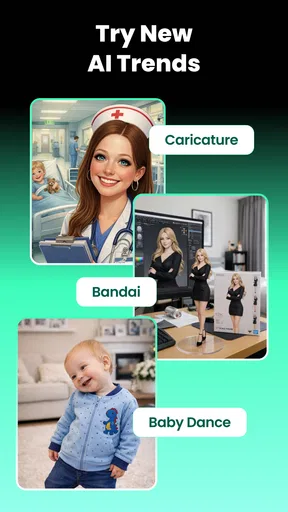
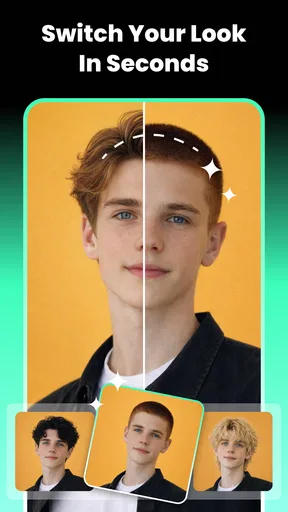

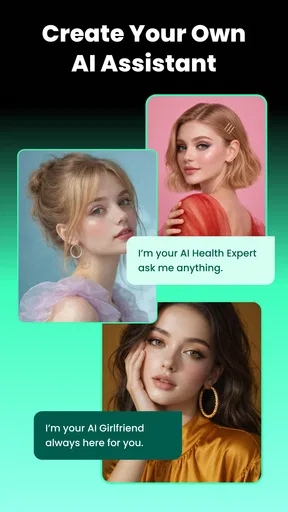
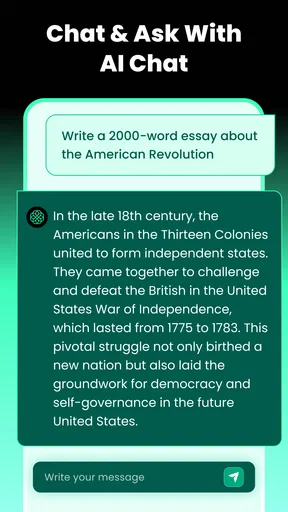
 Analysis by AppCompare
When I need a quick answer, a rough draft, or a way to turn a half-formed idea into something usable, the usual routine can involve jumping between search results, writing tools, and creative apps. AI Chat - Ask your AI Chatbot aims to make that process feel more direct by putting AI chat and creative generation in one productivity app. I find that approach most useful when I want to explore an idea quickly, rather than commit to a specialist tool before I know what I need.
Where a single AI workspace saves time
The practical appeal is less about having a virtual companion on hand and more about reducing small interruptions. Instead of opening a search engine to get a starting point, then a separate editor to shape it, I can begin by asking a question in conversational language. The app is free to install, though it also offers in-app purchases, so I would treat it as an easy way to try an AI workflow rather than assume every capability will be available without limits.
That distinction matters. An AI answer can be a useful first pass, but I still check important facts and rewrite anything that needs to sound like me. I would use it to get unstuck on a dinner idea, outline a message, or brainstorm a short social post—not as the final authority on health, money, or other decisions where a wrong answer could matter.
A useful first session is a small, specific one
Rather than testing the chatbot with a vague prompt such as “tell me something interesting,” I get more value by giving it a clear task and useful constraints. For example, I might ask for a simple weeknight meal using ingredients I already have, or request a polite message that is brief and avoids sounding stiff. Then I can follow up with one change at a time. That makes it easier to judge whether the response is actually helping, and it avoids mistaking a fluent answer for a reliable one.
The app is made by Syphnosys Apps and sits in the productivity space, although its appeal also reaches people who simply enjoy experimenting with conversational AI. It has a 4.0 average from around 203,000 ratings and more than 10 million installs, which suggests that many people have tried it. The age rating is Everyone, and the current version is 2.0.7; those details are useful context, but they do not replace trying the app with the kind of task I expect to use regularly.
Using it for everyday work and ideas
A realistic use for me is the awkward gap between knowing I need to do something and knowing how to start. If I have a busy afternoon and need to write a clear update, I can ask for a concise draft, then add the details the app could not know and adjust the tone myself. For a personal project, I might use chat to generate several directions before choosing one to develop. In both cases, the time saved comes from getting a workable first step, not from handing over the whole task.
Chat is only part of the creative pitch
The app’s positioning also includes AI-generated images and videos, so it may suit someone who wants to explore visual ideas alongside chatbot questions. I would approach that as a quick creative experiment: describe a mood, subject, or concept, then decide whether the result is good enough for the purpose. Generated visuals can be useful for inspiration or informal sharing, but anyone who needs precise brand consistency, detailed editing controls, or a dependable production pipeline may be better served by a dedicated design or video editor.
Worth Reading Before You Choose

Flipboard Shows What News Apps Must Do Beyond the Feed

Switching to Android Auto Means Rethinking Your Driving Routine

Google Calendar Makes a Crowded Week Easier to Manage

Ludo King Makes the Most of the Minutes Between Plans

Baby Panda World Brings Quick Play to Modern Phones, but Its Game Library Feels Busy

ESPN’s Live Game View Makes Following Close Games Easier
That is the main trade-off with an all-in-one AI app. A single place for chat, photos, and videos can reduce app switching, but a specialist tool often gives more control over one particular job. If I only need text answers, a familiar chatbot may be simpler. If I need polished visual work, I would compare the generated result with what a purpose-built creative app can do before building it into my workflow.
Keep prompts useful and expectations realistic
A small habit makes AI chat more productive: include the audience, purpose, and desired length in the first request. “Write a friendly reminder for a neighbor, under a few sentences” gives the model a clearer target than “help me write a message.” I also avoid putting sensitive personal details into prompts unless I have checked the app’s current privacy information and am comfortable with how that information is handled.
AI-generated responses can sound confident even when they need correction, and creative output may take some prompting before it matches the idea in my head. For that reason, I treat the app as a drafting partner, not an automatic fact-checker or a replacement for careful editing. That simple boundary makes its convenience more valuable and helps prevent a polished answer from being mistaken for a verified one.
Who is likely to get the most from it?
I can see this being a good fit for curious users who want one approachable place to ask everyday questions, get a first draft, or test AI image and video ideas without starting with several separate apps. It is especially handy for people who work in short bursts: a student brainstorming a topic, a parent looking for a fresh activity idea, or someone shaping a quick caption between other tasks. In each case, the strongest benefit is lowering the effort needed to begin.
It is less suited to someone who needs tightly controlled, repeatable professional output or who expects every answer to be accurate without checking. People who rarely use AI may also find that a regular search engine or notes app is enough for their needs. And if creative work is the main goal, a dedicated editor may make more sense than a combined chat-and-generation tool.
What to consider before relying on it
The app is free to download, with in-app purchases ranging from $5.99 to $199.99 per item. I would check the purchase details in the app before depending on a feature for regular work, especially if I only want occasional help. Its release date is January 19, 2024, and it requires Android 7.0 or later on Android devices. Those basics make it easier to decide whether it fits a device and budget, while the best way to judge its day-to-day value is to test a few representative prompts.
One useful test is to run the same everyday task through the app and through the tool I already use. Compare not just the answer, but the effort: how much prompt rewriting was needed, how much editing remained, and whether switching tools would have been faster. For images or videos, judge whether the result is usable for the intended context rather than simply novel. This gives a more honest measure of convenience than trying a single entertaining prompt.
If you’re like me and love having a chat with a virtual buddy, then AI Chat - Ask your AI Chatbot might just be your new favorite app. This app offers an engaging way to interact with AI, helping you with everything from answering questions to just having a casual conversation. Let’s dive into the details and see what makes this app tick.
The first impression and setup
First off, installing the app is a breeze. Whether you're on Android or iOS, a quick visit to your app store and you’re ready to roll. The app doesn’t hog much space, which is always a plus in my book. Once installed, you’re greeted by a clean, user-friendly interface that’s both inviting and easy to navigate. Even if you’re not tech-savvy, you’ll find your way around in no time.
The Chat Experience
Jumping right into a conversation, the AI feels surprisingly human-like. It’s almost as if it has a personality of its own. Whether you're asking for a recipe, looking for travel advice, or just want to chat about your day, the bot offers thoughtful and sometimes witty responses. The natural language processing capabilities are impressive, making interactions smooth and enjoyable.
One feature that stands out is the ability to customize your chat experience. You can tweak settings to make interactions more formal or casual, depending on your mood. This flexibility is fantastic, as it allows the app to cater to a wide range of users and preferences.
Features Galore
What’s a chatbot without a few bells and whistles? The app doesn’t disappoint in this department. The app includes:
- Knowledge Base: The AI is loaded with a vast array of topics, meaning it can chat about almost anything under the sun.
- Learning Ability: Over time, the bot learns from interactions, making future conversations even more personalized.
- Multilingual Support: If you're bilingual or learning a new language, this feature is a game-changer.
These features not only enhance the chat experience but also make the app a versatile tool for learning and entertainment.
Performance and Reliability
In terms of performance, the app runs smoothly without crashes or delays, which is crucial for any app, especially one that relies on real-time interaction. The developers have clearly put in the work to ensure a seamless user experience. Plus, it doesn’t drain your battery like some other resource-heavy apps, so you can chat away without worrying about reaching for the charger.
Privacy and Security
With any app that involves personal data, privacy is a concern. Thankfully, the app takes this seriously. The app implements strong encryption to keep your conversations private. Furthermore, it gives users control over their data, allowing you to delete chat history whenever you want. It’s a comforting touch that shows the developers respect user privacy.
My verdict for everyday use
In a world where technology often feels impersonal, the app offers a refreshing change. It’s a blend of fun and functionality, making it a must-have for anyone who enjoys engaging with AI. Whether you’re using it for informative chats or just passing time, this app delivers on its promises, providing a delightful user experience.
So, if you're ready to meet your new virtual chat buddy, give this app a download. It’s like having a pocket-sized conversationalist ready to chat at any moment. Who wouldn’t want that?
Pros
- Intuitive and user-friendly interface.
- Supports multiple languages for global use.
- Offers quick and accurate responses.
- Highly customizable settings.
- Lightweight and easy to install.
Cons
- Limited free version features.
- Requires constant internet connection.
- Occasional lag in response time.
- Lacks voice interaction feature.
- Some answers lack depth or context.
FAQs for AI Chat - Ask your AI Chatbot
What features does AI Chat offer?
AI Chat provides a variety of features including real-time messaging, voice input, and multilingual support. Users can ask questions, receive information, and engage in interactive conversations. The app also allows personalization of responses and integrates with other apps for enhanced functionality.
Is AI Chat secure and private?
Yes, AI Chat prioritizes user privacy and security. It uses end-to-end encryption to protect conversations and does not store personal data without consent. Users can also customize privacy settings to control what information is shared with the app.
Can AI Chat understand multiple languages?
Absolutely! AI Chat supports multiple languages, allowing users to interact in their preferred language. The app includes a language detection feature and can switch between languages seamlessly, making it accessible to a diverse user base.
Is AI Chat suitable for all age groups?
AI Chat is designed to be user-friendly for a wide range of age groups. However, parental guidance is advised for younger users due to the potential for complex interactions. The app includes features to ensure a safe and appropriate user experience for all ages.
Does AI Chat require an internet connection to function?
Yes, AI Chat requires an internet connection to access its full range of features. While some basic functionalities might work offline, for the best experience and accurate responses, a stable internet connection is recommended.


